怎样才算成功启用中间结果落盘功能?

为了更快的定位您的问题,请提供以下信息,谢谢
【详述】启用中间结果落盘功能
【背景】海豚调度执行sql任务,报错内存到达be限制
【业务影响】海豚调度任务失败
【是否存算分离】否
【StarRocks版本】3.4.3
【集群规模】1fe+1be
【机器信息】CPU虚拟核/内存/网卡,例如:80C/128G/千兆
【联系方式】联系方式:社区群24-日月lin 邮箱 minglinlihong@163.com,谢谢
【附件】

  • fe.log/beINFO/相应截图
  • 慢查询:
    • Profile信息
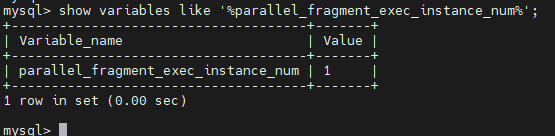
    • 并行度:show variables like ‘%parallel_fragment_exec_instance_num%’;
      image
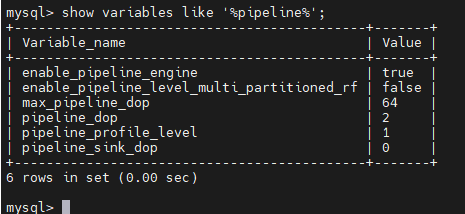
    • pipeline是否开启:show variables like ‘%pipeline%’;
      image
      be.conf 指定落盘路径 spill_local_storage_dir,mem_limit = 8G,
      全局变量
      SET GLOBAL enable_spill = true;
      SET GLOBAL spill_mode = ‘auto’; 并重启生效

c3bae6e0f282b8cce8fc52f7f856b5c0

但指定路径spill_local_storage_dir仍然无文件,海豚调度任务仍然终止报错,中间结果落盘没达到效果,不知怎样才能成功启用该功能?

貌似已经是能够落盘的,仅仅需要几步,改完配置重启下集群

  1. be.conf配置落盘路径
    spill_local_storage_dir=/data/bigdata/spill

  2. sr开启中间结果落盘,全局
    SET global enable_spill = true;

  3. sr落盘模式,全局
    SET global spill_mode = “auto”;

  4. 查看be日志,查看落盘记录
    grep “spilled” be.INFO | awk ‘!/spilled bytes:0/ && /spilled bytes:[0-9]+/’

成功记录如下, spilled bytes: 的值大于0

context life time:66161158236 cpu costs:145341458227 peak memusage:4830972536 scan_bytes:10120472410 spilled bytes:2924566857
